graph TD
  A[Raw CSV: Hevy + Diet] --> B[Cleaning & Validation: Silver]
  B --> C[PostgreSQL: Normalized Schema]
  C --> D[Gold Weekly Views]
  D --> E[Canonical JSON Contract]
  E --> F[Amazon Bedrock: LLM Analysis]
Fitness Analytics Platform +LLM (End-to-End)
Introduction
This project implements a complete end-to-end data engineering pipeline for strength training and nutrition data.
The objective was to design a production-style analytical data system capable of:
- Auditing and validating raw operational data
- Modeling relationally in PostgreSQL
- Executing idempotent ETL pipelines
- Producing deterministic weekly aggregations
- Generating a canonical JSON contract for LLM consumption
- Running in AWS under a controlled, low-cost architecture
Architecture Overview
The system was designed for deterministic weekly reproducibility.
Data Sources
Workout Data (Hevy)
- Format: CSV export
- Granularity: 1 row = 1 set
- Historical coverage: 2023–2026
- Total rows: 9542
- Total unique exercises: 118
Diet Data
- Source: SQLite (personal databse) → CSV export
- Granularity: 1 row per day
- Includes:
- Macros
- Calories
- Cardio volume
- Bodyweight
- Cycle classification
Stage 1: Raw Workout Data
Before modeling or automation, a full exploratory and quality audit was conducted.
Iinitial Load:
Show Code
df = pd.read_csv('hevy_workouts_raw.csv')
df.shape
(9542, 14)Sample:
Show Code
df.head(10)| title | start_time | end_time | description | exercise_title | superset_id | exercise_notes | set_index | set_type | weight_kg | reps | distance_km | duration_seconds | rpe | |
|---|---|---|---|---|---|---|---|---|---|---|---|---|---|---|
| 0 | Lower | 13 Jan 2026, 18:43 | 13 Jan 2026, 20:03 | NaN | Hip Adduction (Machine) | NaN | NaN | 0 | normal | 90.00 | 5.0 | NaN | NaN | NaN |
| 1 | Lower | 13 Jan 2026, 18:43 | 13 Jan 2026, 20:03 | NaN | Hip Adduction (Machine) | NaN | NaN | 1 | normal | 86.25 | 6.0 | NaN | NaN | NaN |
| 2 | Lower | 13 Jan 2026, 18:43 | 13 Jan 2026, 20:03 | NaN | Hip Adduction (Machine) | NaN | NaN | 2 | failure | 86.25 | 6.0 | NaN | NaN | NaN |
| 3 | Lower | 13 Jan 2026, 18:43 | 13 Jan 2026, 20:03 | NaN | Straight Leg Deadlift | NaN | 2RIR? | 0 | normal | 100.00 | 6.0 | NaN | NaN | NaN |
| 4 | Lower | 13 Jan 2026, 18:43 | 13 Jan 2026, 20:03 | NaN | Straight Leg Deadlift | NaN | 2RIR? | 1 | normal | 100.00 | 6.0 | NaN | NaN | NaN |
| 5 | Lower | 13 Jan 2026, 18:43 | 13 Jan 2026, 20:03 | NaN | Leg Press (Machine) | NaN | 2RIR | 0 | normal | 260.00 | 5.0 | NaN | NaN | NaN |
| 6 | Lower | 13 Jan 2026, 18:43 | 13 Jan 2026, 20:03 | NaN | Leg Press (Machine) | NaN | 2RIR | 1 | normal | 260.00 | 5.0 | NaN | NaN | NaN |
| 7 | Lower | 13 Jan 2026, 18:43 | 13 Jan 2026, 20:03 | NaN | Seated Leg Curl (Machine) | NaN | NaN | 0 | normal | 110.00 | 6.0 | NaN | NaN | NaN |
| 8 | Lower | 13 Jan 2026, 18:43 | 13 Jan 2026, 20:03 | NaN | Leg Extension (Machine) | NaN | 1RIR | 0 | normal | 101.25 | 9.0 | NaN | NaN | NaN |
| 9 | Lower | 13 Jan 2026, 18:43 | 13 Jan 2026, 20:03 | NaN | Leg Extension (Machine) | NaN | 1RIR | 1 | normal | 101.25 | 7.0 | NaN | NaN | NaN |
Types:
Show Code
df.dtypestitle object
start_time object
end_time object
description object
exercise_title object
superset_id float64
exercise_notes object
set_index int64
set_type object
weight_kg float64
reps float64
distance_km float64
duration_seconds float64
rpe float64
dtype: objectColumns:
Show Code
df.columnsIndex(['title', 'start_time', 'end_time', 'description', 'exercise_title',
'superset_id', 'exercise_notes', 'set_index', 'set_type', 'weight_kg',
'reps', 'distance_km', 'duration_seconds', 'rpe'],
dtype='object')There is no need to capture the training start and end times along with the date; therefore, we must split them into a column for the training date (training_date) and another for the training duration (derived from start_time and end_time).
EDA - Exploratory Data Analysis
Checking Missing Values:
Show Code
valores_ausentes = df.isnull().sum().sort_values(ascending = False)
print(valores_ausentes)
superset_id 9542
rpe 9542
distance_km 9541
duration_seconds 9209
exercise_notes 8466
description 5264
weight_kg 708
reps 333
title 0
start_time 0
end_time 0
exercise_title 0
set_index 0
set_type 0
dtype: int64- superset_id: Never used; consistently contains null values.
- rpe: Same status as superset_id (all values missing).
- distance_km: Only applicable for treadmill workouts; usually null as I track by time.
- duration_seconds: Cardio duration; only present in cardio exercises.
- exercise_notes: Exercise-specific comments; optional/not always required.
- description: Training session description added upon completion; also optional.
- weight_kg: Null for bodyweight exercises and cardio (no load).
- reps: To be analyzed.
weight_kg column missing values where ‘weight_kg’ is NaN and exercise type is not cardio:
Show Code
exercicios_excluidos = ['Treadmill', 'Stair Machine (Floors)', 'Stair Machine (Steps)', 'Stair Machine','Spinning', 'Walking', 'Air Bike']

linhas_ausentes_carga = df[
    df['weight_kg'].isna() &
    ~df['exercise_title'].isin(exercicios_excluidos)
]
linhas_ausentes_carga| title | start_time | end_time | description | exercise_title | superset_id | exercise_notes | set_index | set_type | weight_kg | reps | distance_km | duration_seconds | rpe | |
|---|---|---|---|---|---|---|---|---|---|---|---|---|---|---|
| 1740 | Upper I | 26 May 2025, 19:46 | 26 May 2025, 21:23 | NaN | Chest Dip (Assisted) | NaN | NaN | 0 | normal | NaN | 8.0 | NaN | NaN | NaN |
| 1741 | Upper I | 26 May 2025, 19:46 | 26 May 2025, 21:23 | NaN | Chest Dip (Assisted) | NaN | NaN | 1 | failure | NaN | 8.0 | NaN | NaN | NaN |
| 1799 | Upper I | 19 May 2025, 19:54 | 19 May 2025, 21:43 | NaN | Chest Dip (Assisted) | NaN | NaN | 1 | failure | NaN | 7.0 | NaN | NaN | NaN |
| 3154 | Push 2 e Pull 2 | 28 Dec 2024, 09:18 | 28 Dec 2024, 10:59 | Pull 2 | Romanian Chair Sit Ups | NaN | NaN | 0 | normal | NaN | 9.0 | NaN | NaN | NaN |
| 3155 | Push 2 e Pull 2 | 28 Dec 2024, 09:18 | 28 Dec 2024, 10:59 | Pull 2 | Romanian Chair Sit Ups | NaN | NaN | 1 | normal | NaN | 7.0 | NaN | NaN | NaN |
| ... | ... | ... | ... | ... | ... | ... | ... | ... | ... | ... | ... | ... | ... | ... |
| 9411 | Treino A - Costas + Biceps | 27 Nov 2023, 17:19 | 27 Nov 2023, 18:18 | NaN | Back Extension (Hyperextension) | NaN | NaN | 3 | normal | NaN | 10.0 | NaN | NaN | NaN |
| 9518 | Treino A - Costas + Biceps | 21 Nov 2023, 17:54 | 21 Nov 2023, 18:48 | NaN | Back Extension (Hyperextension) | NaN | NaN | 0 | normal | NaN | 10.0 | NaN | NaN | NaN |
| 9519 | Treino A - Costas + Biceps | 21 Nov 2023, 17:54 | 21 Nov 2023, 18:48 | NaN | Back Extension (Hyperextension) | NaN | NaN | 1 | normal | NaN | 10.0 | NaN | NaN | NaN |
| 9520 | Treino A - Costas + Biceps | 21 Nov 2023, 17:54 | 21 Nov 2023, 18:48 | NaN | Back Extension (Hyperextension) | NaN | NaN | 2 | normal | NaN | 10.0 | NaN | NaN | NaN |
| 9521 | Treino A - Costas + Biceps | 21 Nov 2023, 17:54 | 21 Nov 2023, 18:48 | NaN | Back Extension (Hyperextension) | NaN | NaN | 3 | normal | NaN | 10.0 | NaN | NaN | NaN |
376 rows × 14 columns
Visualizing missing value distribution:
Show Code
linhas_ausentes_carga = df[
    df['weight_kg'].isna() &
    ~df['exercise_title'].isin(exercicios_excluidos)
]
linhas_ausentes_carga['exercise_title'].value_counts()
exercise_title
Back Extension (Hyperextension) 201
Pull Up 86
Knee Raise Parallel Bars 53
Leg Raise Parallel Bars 8
Bench Dip 7
Decline Crunch 4
Chin Up 4
Chest Dip (Assisted) 3
Romanian Chair Sit Ups 3
Decline Crunch (Weighted) 2
Squat (Smith Machine) 1
Push Up 1
Squat (Bodyweight) 1
Bicep Curl (Machine) 1
Plank 1
Name: count, dtype: int64Missing values for Back Extension (Hyperextension), Pull Up, Knee Raise Parallel Bars, Leg Raise Parallel Bars, Bench Dip, Decline Crunch, Chin Up, Chest Dip (Assisted), Romanian Chair Sit Ups, Decline Crunch (Weighted), Squat (Bodyweight), Push Up, and Plank are expected as these are bodyweight exercises. However, Bicep Curl (Machine) should not have missing values, and Squat (Smith Machine) was likely a zero-load warm-up, but we will investigate further.
Filtering these two exercises with null values in weight_kg:
Show Code
exercicios_interesse = [
    'Squat (Smith Machine)',
    'Bicep Curl (Machine)'
]

df[
    df['weight_kg'].isna() &
    df['exercise_title'].isin(exercicios_interesse)
]| title | start_time | end_time | description | exercise_title | superset_id | exercise_notes | set_index | set_type | weight_kg | reps | distance_km | duration_seconds | rpe | |
|---|---|---|---|---|---|---|---|---|---|---|---|---|---|---|
| 5270 | Perna Completo | 31 Jul 2024, 07:42 | 31 Jul 2024, 09:01 | NaN | Squat (Smith Machine) | NaN | NaN | 0 | warmup | NaN | 30.0 | NaN | NaN | NaN |
| 6644 | Costas + Biceps + Lombar - Treino 2 | 14 May 2024, 11:11 | 14 May 2024, 12:36 | NaN | Bicep Curl (Machine) | NaN | NaN | 2 | failure | NaN | 9.0 | NaN | NaN | NaN |
We confirmed the Smith Machine was a warm-up, but there is likely an error in the bicep exercise, as it is a set to failure and the set_index is 2, meaning it is the third set of this exercise.
Analyzing exactly this exercise on this specific date:
Show Code
df[
    (df['title'] == 'Costas + Biceps + Lombar - Treino 2') &
    (df['exercise_title'] == 'Bicep Curl (Machine)') &
    (df['start_time'].str.contains('14 May 2024'))
]| title | start_time | end_time | description | exercise_title | superset_id | exercise_notes | set_index | set_type | weight_kg | reps | distance_km | duration_seconds | rpe | |
|---|---|---|---|---|---|---|---|---|---|---|---|---|---|---|
| 6642 | Costas + Biceps + Lombar - Treino 2 | 14 May 2024, 11:11 | 14 May 2024, 12:36 | NaN | Bicep Curl (Machine) | NaN | NaN | 0 | normal | 54.0 | 12.0 | NaN | NaN | NaN |
| 6643 | Costas + Biceps + Lombar - Treino 2 | 14 May 2024, 11:11 | 14 May 2024, 12:36 | NaN | Bicep Curl (Machine) | NaN | NaN | 1 | failure | 54.0 | 10.0 | NaN | NaN | NaN |
| 6644 | Costas + Biceps + Lombar - Treino 2 | 14 May 2024, 11:11 | 14 May 2024, 12:36 | NaN | Bicep Curl (Machine) | NaN | NaN | 2 | failure | NaN | 9.0 | NaN | NaN | NaN |
After analysis, we confirmed a manual entry error, resulting in the missing value; the correct value is 54.0 kg.
Imputing the correct value for this set:
Show Code
df.loc[6644, 'weight_kg'] = 54.0reps column missing values where ‘reps’ is NaN and exercise type is not cardio:
Show Code
exercicios_excluidos = ['Treadmill', 'Stair Machine (Floors)', 'Stair Machine (Steps)', 'Stair Machine','Spinning', 'Walking', 'Air Bike']

linhas_ausentes_repeticoes = df[
    df['reps'].isna() &
    ~df['exercise_title'].isin(exercicios_excluidos)
]

linhas_ausentes_repeticoes| title | start_time | end_time | description | exercise_title | superset_id | exercise_notes | set_index | set_type | weight_kg | reps | distance_km | duration_seconds | rpe | |
|---|---|---|---|---|---|---|---|---|---|---|---|---|---|---|
| 8022 | (S1 ) Peito + Triceps + Abs - Treino 1 | 26 Feb 2024, 10:54 | 26 Feb 2024, 11:53 | Treino 6 | Plank | NaN | NaN | 0 | normal | NaN | NaN | NaN | 48.0 | NaN |
Plank is also an exercise where the absence of repetitions is expected and acceptable
Outlier Detectition
Function to detect outliers using the IQR (Interquartile Range) method:
Show Code
def detectar_outliers(df, coluna):
    Q1 = df[coluna].quantile(0.25)
    Q3 = df[coluna].quantile(0.75)
    IQR = Q3 - Q1
    limite_inferior = Q1 - 1.5 * IQR
    limite_superior = Q3 + 1.5 * IQR

    outliers = df[(df[coluna] < limite_inferior) | (df[coluna] > limite_superior)]
    return outliers
Detecting and displaying total outliers per column:
Show Code
colunas = ['weight_kg', 'reps']
for coluna in colunas:
    outliers = detectar_outliers(df, coluna)
    print(f"Total de outliers em '{coluna}': {len(outliers)}")
Total de outliers em 'weight_kg': 121
Total de outliers em 'reps': 239Detect and display outliers for the ‘weight_kg’ column:
Show Code
outliers_carga_kg = detectar_outliers(df, 'weight_kg')

if not outliers_carga_kg.empty:
    print("Outliers em 'weight_kg (119) ':")
    print(outliers_carga_kg[['exercise_title', 'start_time', 'weight_kg', 'reps']])
Outliers em 'weight_kg (119) ':
exercise_title start_time weight_kg reps
5 Leg Press (Machine) 13 Jan 2026, 18:43 260.0 5.0
6 Leg Press (Machine) 13 Jan 2026, 18:43 260.0 5.0
73 Leg Press (Machine) 6 Jan 2026, 19:46 280.0 6.0
74 Leg Press (Machine) 6 Jan 2026, 19:46 280.0 5.0
132 Leg Press (Machine) 30 Dec 2025, 18:26 280.0 5.0
133 Leg Press (Machine) 30 Dec 2025, 18:26 260.0 6.0
186 Leg Press (Machine) 23 Dec 2025, 11:58 280.0 7.0
187 Leg Press (Machine) 23 Dec 2025, 11:58 260.0 7.0
252 Leg Press (Machine) 16 Dec 2025, 19:47 280.0 7.0
253 Leg Press (Machine) 16 Dec 2025, 19:47 280.0 6.0
309 Leg Press (Machine) 9 Dec 2025, 20:32 280.0 7.0
310 Leg Press (Machine) 9 Dec 2025, 20:32 280.0 6.0
374 Leg Press (Machine) 2 Dec 2025, 20:03 280.0 6.0
375 Leg Press (Machine) 2 Dec 2025, 20:03 280.0 5.0
464 Leg Press (Machine) 18 Nov 2025, 19:25 275.0 6.0
465 Leg Press (Machine) 18 Nov 2025, 19:25 275.0 6.0
522 Leg Press (Machine) 11 Nov 2025, 20:13 270.0 7.0
523 Leg Press (Machine) 11 Nov 2025, 20:13 275.0 6.0
583 Leg Press (Machine) 4 Nov 2025, 20:10 270.0 7.0
584 Leg Press (Machine) 4 Nov 2025, 20:10 270.0 7.0
647 Leg Press (Machine) 28 Oct 2025, 19:41 270.0 7.0
648 Leg Press (Machine) 28 Oct 2025, 19:41 270.0 7.0
713 Leg Press (Machine) 21 Oct 2025, 19:50 270.0 6.0
714 Leg Press (Machine) 21 Oct 2025, 19:50 270.0 6.0
771 Leg Press (Machine) 14 Oct 2025, 19:57 265.0 7.0
772 Leg Press (Machine) 14 Oct 2025, 19:57 267.0 6.0
826 Leg Press (Machine) 7 Oct 2025, 20:24 265.0 7.0
827 Leg Press (Machine) 7 Oct 2025, 20:24 265.0 6.0
914 Leg Press (Machine) 23 Sep 2025, 19:21 265.0 6.0
915 Leg Press (Machine) 23 Sep 2025, 19:21 265.0 6.0
965 Leg Press (Machine) 16 Sep 2025, 19:37 265.0 6.0
966 Leg Press (Machine) 16 Sep 2025, 19:37 265.0 6.0
1022 Leg Press (Machine) 9 Sep 2025, 20:22 265.0 6.0
1023 Leg Press (Machine) 9 Sep 2025, 20:22 265.0 5.0
1081 Leg Press (Machine) 2 Sep 2025, 20:23 260.0 7.0
1082 Leg Press (Machine) 2 Sep 2025, 20:23 265.0 6.0
1136 Leg Press (Machine) 26 Aug 2025, 20:35 260.0 7.0
1137 Leg Press (Machine) 26 Aug 2025, 20:35 260.0 6.0
1236 Leg Press (Machine) 29 Jul 2025, 19:49 250.0 7.0
1237 Leg Press (Machine) 29 Jul 2025, 19:49 260.0 6.0
1554 Leg Press (Machine) 17 Jun 2025, 20:14 260.0 5.0
1555 Leg Press (Machine) 17 Jun 2025, 20:14 260.0 6.0
1613 Leg Press (Machine) 10 Jun 2025, 20:17 260.0 6.0
1614 Leg Press (Machine) 10 Jun 2025, 20:17 260.0 5.0
1671 Leg Press (Machine) 3 Jun 2025, 19:51 255.0 7.0
1672 Leg Press (Machine) 3 Jun 2025, 19:51 260.0 6.0
1729 Leg Press (Machine) 27 May 2025, 19:55 250.0 7.0
1730 Leg Press (Machine) 27 May 2025, 19:55 255.0 6.0
1787 Leg Press (Machine) 20 May 2025, 20:06 250.0 7.0
1788 Leg Press (Machine) 20 May 2025, 20:06 250.0 6.0
1847 Leg Press (Machine) 13 May 2025, 19:48 240.0 7.0
1848 Leg Press (Machine) 13 May 2025, 19:48 250.0 7.0
1905 Leg Press (Machine) 6 May 2025, 07:17 280.0 6.0
1906 Leg Press (Machine) 6 May 2025, 07:17 280.0 5.0
1961 Leg Press (Machine) 29 Apr 2025, 07:11 280.0 8.0
1962 Leg Press (Machine) 29 Apr 2025, 07:11 285.0 8.0
2036 Leg Press (Machine) 15 Apr 2025, 20:28 280.0 8.0
2037 Leg Press (Machine) 15 Apr 2025, 20:28 285.0 8.0
2096 Leg Press (Machine) 8 Apr 2025, 19:14 260.0 8.0
2097 Leg Press (Machine) 8 Apr 2025, 19:14 270.0 8.0
2158 Leg Press (Machine) 1 Apr 2025, 06:28 260.0 8.0
2159 Leg Press (Machine) 1 Apr 2025, 06:28 270.0 7.0
2222 Leg Press (Machine) 25 Mar 2025, 19:14 240.0 8.0
2223 Leg Press (Machine) 25 Mar 2025, 19:14 270.0 7.0
2288 Leg Press (Machine) 18 Mar 2025, 18:29 240.0 8.0
2289 Leg Press (Machine) 18 Mar 2025, 18:29 260.0 8.0
2330 Leg Press (Machine) 14 Mar 2025, 18:32 240.0 9.0
2331 Leg Press (Machine) 14 Mar 2025, 18:32 260.0 8.0
2332 Leg Press (Machine) 14 Mar 2025, 18:32 280.0 7.0
3776 Leg Press (Machine) 13 Nov 2024, 07:04 200.0 12.0
3777 Leg Press (Machine) 13 Nov 2024, 07:04 220.0 10.0
3778 Leg Press (Machine) 13 Nov 2024, 07:04 240.0 9.0
4002 Leg Press (Machine) 30 Oct 2024, 07:14 200.0 10.0
4003 Leg Press (Machine) 30 Oct 2024, 07:14 220.0 10.0
4004 Leg Press (Machine) 30 Oct 2024, 07:14 240.0 8.0
4206 Leg Press (Machine) 16 Oct 2024, 07:12 160.0 10.0
4207 Leg Press (Machine) 16 Oct 2024, 07:12 200.0 10.0
4208 Leg Press (Machine) 16 Oct 2024, 07:12 240.0 8.0
5520 Leg Press (Machine) 17 Jan 2024, 12:00 160.0 11.0
5521 Leg Press (Machine) 17 Jan 2024, 12:00 160.0 10.0
5522 Leg Press (Machine) 17 Jan 2024, 12:00 200.0 10.0
5523 Leg Press (Machine) 17 Jan 2024, 12:00 200.0 10.0
7692 Leg Press (Machine) 13 Mar 2024, 11:03 160.0 11.0
7693 Leg Press (Machine) 13 Mar 2024, 11:03 160.0 10.0
7694 Leg Press (Machine) 13 Mar 2024, 11:03 200.0 10.0
7695 Leg Press (Machine) 13 Mar 2024, 11:03 200.0 10.0
8190 Leg Press (Machine) 14 Feb 2024, 11:07 200.0 12.0
8191 Leg Press (Machine) 14 Feb 2024, 11:07 200.0 12.0
8192 Leg Press (Machine) 14 Feb 2024, 11:07 200.0 11.0
8428 Leg Press (Machine) 31 Jan 2024, 10:53 200.0 11.0
8429 Leg Press (Machine) 31 Jan 2024, 10:53 200.0 10.0
8430 Leg Press (Machine) 31 Jan 2024, 10:53 200.0 10.0
8431 Leg Press (Machine) 31 Jan 2024, 10:53 200.0 10.0
8566 Leg Press (Machine) 24 Jan 2024, 10:52 200.0 11.0
8567 Leg Press (Machine) 24 Jan 2024, 10:52 200.0 10.0
8568 Leg Press (Machine) 24 Jan 2024, 10:52 200.0 10.0
8569 Leg Press (Machine) 24 Jan 2024, 10:52 200.0 10.0
8792 Leg Press (Machine) 2 Jan 2024, 17:11 200.0 10.0
8793 Leg Press (Machine) 2 Jan 2024, 17:11 200.0 10.0
8794 Leg Press (Machine) 2 Jan 2024, 17:11 200.0 10.0
8795 Leg Press (Machine) 2 Jan 2024, 17:11 200.0 10.0
8871 Leg Press (Machine) 29 Dec 2023, 10:40 200.0 10.0
8872 Leg Press (Machine) 29 Dec 2023, 10:40 200.0 10.0
8873 Leg Press (Machine) 29 Dec 2023, 10:40 200.0 10.0
8874 Leg Press (Machine) 29 Dec 2023, 10:40 200.0 10.0
9057 Leg Press (Machine) 18 Dec 2023, 10:45 200.0 10.0
9058 Leg Press (Machine) 18 Dec 2023, 10:45 200.0 10.0
9059 Leg Press (Machine) 18 Dec 2023, 10:45 200.0 10.0
9060 Leg Press (Machine) 18 Dec 2023, 10:45 200.0 10.0
9140 Leg Press (Machine) 12 Dec 2023, 10:44 200.0 10.0
9141 Leg Press (Machine) 12 Dec 2023, 10:44 200.0 10.0
9142 Leg Press (Machine) 12 Dec 2023, 10:44 200.0 10.0
9143 Leg Press (Machine) 12 Dec 2023, 10:44 240.0 9.0
9250 Leg Press (Machine) 6 Dec 2023, 17:48 200.0 10.0
9251 Leg Press (Machine) 6 Dec 2023, 17:48 200.0 10.0
9252 Leg Press (Machine) 6 Dec 2023, 17:48 200.0 10.0
9253 Leg Press (Machine) 6 Dec 2023, 17:48 240.0 9.0
9464 Leg Press (Machine) 20 Nov 2023, 17:37 160.0 10.0
9465 Leg Press (Machine) 20 Nov 2023, 17:37 160.0 10.0
9466 Leg Press (Machine) 20 Nov 2023, 17:37 160.0 10.0
9467 Leg Press (Machine) 20 Nov 2023, 17:37 160.0 10.0Groups and counts how many outliers there are by exercise title:
Show Code
# 1. Detecta todos os outliers novamente
outliers_original = detectar_outliers(df, 'weight_kg')
# 2. Agrupa e conta quantos outliers existem por título de exercício
contagem_outliers = outliers_original['exercise_title'].value_counts()
print("Distribuição de Outliers por Exercício:")
print(contagem_outliers)
Distribuição de Outliers por Exercício:
exercise_title
Leg Press (Machine) 121
Name: count, dtype: int64Legpress is an exercise where the absolute weight is significantly higher compared to the other exercises but they are not necessarily outliers
Leg Press (Machine) visualization:
Show Code
exercise_name = "Leg Press (Machine)"
df_ex = df[df["exercise_title"] == exercise_name]
fig = px.box(df_ex,y="weight_kg",points="all",hover_data=["reps","set_index","set_type","rpe","start_time"],title=f"Weight Distribuiton — {exercise_name}")
fig.update_layout(yaxis_title="Weight",xaxis_title="",showlegend=False,height=600,width=900,title_x = 0.5)
fig.show()
Correct values. Since my training is based on progressive overload, it makes sense that values close to 280 kg have few records, as they represent the most recent loads lifted.
Detect and display outliers for the ‘reps’ column:
Show Code
outliers_repeticoes = detectar_outliers(df, 'reps')

if not outliers_repeticoes.empty:
    print("Outliers em 'repeticoes (209) ':")
    print(outliers_repeticoes[['exercise_title','weight_kg', 'reps']])
Outliers em 'repeticoes (209) ':
exercise_title weight_kg reps
3860 Standing Calf Raise (Machine) 20.0 30.0
3861 Standing Calf Raise (Machine) 40.0 25.0
3862 Standing Calf Raise (Machine) 60.0 20.0
3867 Standing Calf Raise (Machine) 40.0 24.0
3868 Standing Calf Raise (Machine) 20.0 30.0
... ... ... ...
8907 Incline Bench Press (Dumbbell) 17.5 20.0
8957 Seated Shoulder Press (Machine) 37.5 20.0
9021 Seated Shoulder Press (Machine) 37.5 20.0
9105 Seated Shoulder Press (Machine) 37.5 20.0
9282 Cable Fly Crossovers 10.0 16.0
[239 rows x 3 columns]Group and count outliers per exercise title:
Show Code
outliers_original = detectar_outliers(df, 'reps')

# 2. Agrupa e conta quantos outliers existem por título de exercício
contagem_outliers = outliers_original['exercise_title'].value_counts()

print("Distribuição de Outliers por Exercício:")
print(contagem_outliers)
Distribuição de Outliers por Exercício:
exercise_title
Standing Calf Raise (Machine) 117
Incline Bench Press (Dumbbell) 18
Lateral Raise (Dumbbell) 11
Calf Extension (Machine) 8
Chest Fly (Machine) 8
Triceps Rope Pushdown 7
Single Arm Tricep Extension (Dumbbell) 6
Triceps Extension (Cable) 6
Lat Pulldown (Cable) 6
Crunch (Machine) 5
Preacher Curl (Machine) 4
Single Arm Lateral Raise (Cable) 4
Lateral Raise (Machine) 4
Chest Press (Machine) 4
Lat Pulldown (Machine) 4
Iso-Lateral High Row (Machine) 4
Seated Cable Row - V Grip (Cable) 4
Seated Incline Curl (Dumbbell) 3
Seated Shoulder Press (Machine) 3
Seated Wrist Extension (Barbell) 3
Bicep Curl (Dumbbell) 3
Squat (Smith Machine) 2
Seated Leg Curl (Machine) 1
Single Leg Standing Calf Raise (Machine) 1
Back Extension (Machine) 1
Single Arm Triceps Pushdown (Cable) 1
Cable Fly Crossovers 1
Name: count, dtype: int64Standing Calf Raise (Machine):
Show Code
exercise_name = "Standing Calf Raise (Machine)"
df_ex = df[df["exercise_title"] == exercise_name]
fig = px.box(df_ex,y="reps",points="all",hover_data=["reps","weight_kg","set_index","set_type","rpe","start_time"],title=f"Reps Distribuiton — {exercise_name}")
fig.update_layout(yaxis_title="Reps",xaxis_title="",showlegend=False,height=600,width=900,title_x = 0.5)
fig.show()
We evaluated all exercises flagged as outliers and the majority (as seen in the example above) were warm-up sets where no load or a very low load was used; therefore, they do not qualify as incorrect data. The only exception was the Preacher Curl (Machine), detailed below, which indeed contained a manual entry error in the number of repetitions and was handled separately.
Preacher Curl (Machine):
Show Code
exercise_name = "Preacher Curl (Machine)"
df_ex = df[df["exercise_title"] == exercise_name]
fig = px.box(df_ex,y="reps",points="all",hover_data=["reps","weight_kg","set_index","set_type","rpe","start_time"],title=f"Reps Distribuiton — {exercise_name}")
fig.update_layout(yaxis_title="Reps",xaxis_title="",showlegend=False,height=600,width=900,title_x = 0.5)
fig.show()
Here we have an incorrect value: where 111 is recorded, it should actually be 11 repetitions
Analyzing this specific exercise instance:
Show Code
df[
    (df['exercise_title'] == 'Preacher Curl (Machine)') &
    (df['start_time'].str.contains('23 Jan 2024'))
]| title | start_time | end_time | description | exercise_title | superset_id | exercise_notes | set_index | set_type | weight_kg | reps | distance_km | duration_seconds | rpe | |
|---|---|---|---|---|---|---|---|---|---|---|---|---|---|---|
| 8604 | Treino B - Costas + Biceps | 23 Jan 2024, 11:09 | 23 Jan 2024, 12:09 | NaN | Preacher Curl (Machine) | NaN | NaN | 0 | normal | 48.75 | 12.0 | NaN | NaN | NaN |
| 8605 | Treino B - Costas + Biceps | 23 Jan 2024, 11:09 | 23 Jan 2024, 12:09 | NaN | Preacher Curl (Machine) | NaN | NaN | 1 | normal | 48.75 | 111.0 | NaN | NaN | NaN |
| 8606 | Treino B - Costas + Biceps | 23 Jan 2024, 11:09 | 23 Jan 2024, 12:09 | NaN | Preacher Curl (Machine) | NaN | NaN | 2 | normal | 48.75 | 12.0 | NaN | NaN | NaN |
Imputing the correct value for this set:
Show Code
df.loc[8605, 'reps'] = 11.0Revalidating the corrected set:
Show Code
df[
    (df['exercise_title'] == 'Preacher Curl (Machine)') &
    (df['start_time'].str.contains('23 Jan 2024'))
]| title | start_time | end_time | description | exercise_title | superset_id | exercise_notes | set_index | set_type | weight_kg | reps | distance_km | duration_seconds | rpe | |
|---|---|---|---|---|---|---|---|---|---|---|---|---|---|---|
| 8604 | Treino B - Costas + Biceps | 23 Jan 2024, 11:09 | 23 Jan 2024, 12:09 | NaN | Preacher Curl (Machine) | NaN | NaN | 0 | normal | 48.75 | 12.0 | NaN | NaN | NaN |
| 8605 | Treino B - Costas + Biceps | 23 Jan 2024, 11:09 | 23 Jan 2024, 12:09 | NaN | Preacher Curl (Machine) | NaN | NaN | 1 | normal | 48.75 | 11.0 | NaN | NaN | NaN |
| 8606 | Treino B - Costas + Biceps | 23 Jan 2024, 11:09 | 23 Jan 2024, 12:09 | NaN | Preacher Curl (Machine) | NaN | NaN | 2 | normal | 48.75 | 12.0 | NaN | NaN | NaN |
Validations
set_index:
Show Code
# Ordenando para garantir consistência
df_sorted = df.sort_values(
    by=["start_time", "exercise_title", "set_index"]
)

# Agrupando por treino + exercício
set_index_check = (
    df_sorted
    .groupby(["start_time", "exercise_title"])["set_index"]
    .apply(list)
    .reset_index(name="set_index_list")
)

# Funções de validação
def starts_with_zero(seq):
    return min(seq) == 0

def has_gaps(seq):
    return sorted(seq) != list(range(min(seq), max(seq) + 1))

# Aplicando validações
set_index_check["starts_with_zero"] = set_index_check["set_index_list"].apply(starts_with_zero)
set_index_check["has_gaps"] = set_index_check["set_index_list"].apply(has_gaps)

# Casos problemáticos
problemas_set_index = set_index_check[
    (~set_index_check["starts_with_zero"]) |
    (set_index_check["has_gaps"])
]

print(f"Total de exercícios analisados: {len(set_index_check)}")
print(f"Casos com problemas de set_index: {len(problemas_set_index)}")

problemas_set_index.head()
Total de exercícios analisados: 3447
Casos com problemas de set_index: 0| start_time | exercise_title | set_index_list | starts_with_zero | has_gaps |
|---|
Workout Duration:
Show Code
# Convertendo para datetime
df["start_time_dt"] = pd.to_datetime(df["start_time"], format="%d %b %Y, %H:%M")
df["end_time_dt"] = pd.to_datetime(df["end_time"], format="%d %b %Y, %H:%M")

# Calculando duração em minutos
df["duracao_treino_min"] = (
    (df["end_time_dt"] - df["start_time_dt"])
    .dt.total_seconds() / 60
)

# Agregando por treino (um treino pode ter várias linhas)
duracao_por_treino = (
    df.groupby(["title", "start_time"])
    .agg(
        duracao_min=("duracao_treino_min", "first")
    )
    .reset_index()
)

# Treinos muito longos (> 4 horas)
treinos_longos = duracao_por_treino[
    duracao_por_treino["duracao_min"] > 240
]

# Treinos muito curtos (< 10 minutos)
treinos_curtos = duracao_por_treino[
    duracao_por_treino["duracao_min"] < 10
]

print(f"Treinos > 4h: {len(treinos_longos)}")
print(f"Treinos < 10min: {len(treinos_curtos)}")

treinos_longos.head(), treinos_curtos.head()
Treinos > 4h: 0
Treinos < 10min: 0(Empty DataFrame
Columns: [title, start_time, duracao_min]
Index: [],
Empty DataFrame
Columns: [title, start_time, duracao_min]
Index: [])Naming Consistency:
Show Code
# Total de exercícios únicos
exercicios_unicos = df["exercise_title"].nunique()

# Frequência por exercício
freq_exercicios = df["exercise_title"].value_counts()

# Exercícios que aparecem apenas 1 vez
exercicios_uma_vez = freq_exercicios[freq_exercicios == 1]

print(f"Total de exercícios únicos: {exercicios_unicos}")
print(f"Exercícios que aparecem apenas 1 vez: {len(exercicios_uma_vez)}")

exercicios_uma_vez.head(10)
Total de exercícios únicos: 118
Exercícios que aparecem apenas 1 vez: 5exercise_title
Squat (Bodyweight) 1
Plank 1
Push Up 1
Walking 1
Stair Machine (Steps) 1
Name: count, dtype: int64Analysis
Workouts per day:
Show Code
# Treinos por dia
df["data_treino"] = df["start_time_dt"].dt.date

treinos_por_dia = (
    df.groupby("data_treino")["title"]
    .nunique()
    .reset_index(name="qtde_treinos")
)

fig = px.bar(
    treinos_por_dia,
    x="data_treino",
    y="qtde_treinos",
    title="Training Frequency Over Time"
)

fig.update_layout(
    xaxis_title="Data",
    yaxis_title="Workout Count",
    title_x=0.5,
    height=500
)

fig.show()
Load progression - Exercise: Seated Leg Curl (Machine):
Show Code
exercise_name = "Seated Leg Curl (Machine)"

df_ex = (
    df[df["exercise_title"] == exercise_name]
    .groupby("data_treino")
    .agg(carga_max=("weight_kg", "max"))
    .reset_index()
)

fig = px.line(
    df_ex,
    x="data_treino",
    y="carga_max",
    markers=True,
    title=f"Load progression — {exercise_name}"
)

fig.update_layout(
    xaxis_title="Data",
    yaxis_title="Maximum Weight (kg)",
    title_x=0.5,
    height=500
)

fig.show()
Load progression - Exercise: Chest Fly (Machine):
Show Code
exercise_name = "Chest Fly (Machine)"

df_ex = (
    df[df["exercise_title"] == exercise_name]
    .groupby("data_treino")
    .agg(carga_max=("weight_kg", "max"))
    .reset_index()
)

fig = px.line(
    df_ex,
    x="data_treino",
    y="carga_max",
    markers=True,
    title=f"Load progression — {exercise_name}"
)

fig.update_layout(
    xaxis_title="Data",
    yaxis_title="Maximum Weight (kg)",
    title_x=0.5,
    height=500
)

fig.show()
Scatter plot: weight vs. rep:
Show Code
fig = px.scatter(
    df,
    x="weight_kg",
    y="reps",
    color="set_type",
    opacity=0.6,
    title="Weight and Reps Scatter",
    hover_data=["exercise_title", "data_treino"]
)

fig.update_layout(
    xaxis_title="Wight (kg)",
    yaxis_title="Repetitions",
    title_x=0.5,
    height=600
)

fig.show()
Workout duration histogram:
Show Code
fig = px.histogram(
    duracao_por_treino,
    x="duracao_min",
    nbins=30,
    title="Workout Duration Distribution (min)"
)

fig.update_layout(
    xaxis_title="Duratiom (min)",
    yaxis_title="Train Count",
    title_x=0.5,
    height=500
)

fig.show()
Most frequent exercises:
Show Code
top_exercicios = (
    df["exercise_title"]
    .value_counts()
    .head(15)
    .reset_index()
)

top_exercicios.columns = ["exercise_title", "frequencia"]

fig = px.bar(
    top_exercicios,
    x="frequencia",
    y="exercise_title",
    orientation="h",
    title="Most Frequent Exercises (Top 15)"
)

fig.update_layout(
    xaxis_title="Number of sets",
    yaxis_title="",
    title_x=0.5,
    height=600,
    yaxis={'categoryorder':'total ascending'}
)

fig.show()
Set types (distribution):
Show Code
fig = px.pie(
    df,
    names="set_type",
    title="Set Type Distribution"
)

fig.update_layout(
    title_x=0.5,
    height=500
)

fig.show()
Training volume:
Show Code
# Garantindo a coluna de data
df["data_treino"] = df["start_time_dt"].dt.date

# Cada linha representa uma série → volume = contagem de linhas
volume_series_diario = (
    df.groupby("data_treino")
    .size()
    .reset_index(name="total_series")
)

fig = px.line(
    volume_series_diario,
    x="data_treino",
    y="total_series",
    markers=True,
    title="Trainning Volume per Day (Number of sets)"
)

fig.update_layout(
    xaxis_title="Data",
    yaxis_title="Total Sets",
    title_x=0.5,
    height=500
)

fig.show()
Set voulme by type:
Show Code
df["data_treino"] = df["start_time_dt"].dt.date

df_efetivas = df[df["set_type"].isin(["normal", "failure"])]

volume_por_tipo = (
    df_efetivas
    .groupby(["data_treino", "set_type"])
    .size()
    .reset_index(name="total_series")
)

fig = px.area(
    volume_por_tipo,
    x="data_treino",
    y="total_series",
    color="set_type",
    title="Total Sets per Type"
)

fig.update_layout(
    xaxis_title="Data",
    yaxis_title="Total Sets",
    title_x=0.5,
    height=500
)

fig.show()
Final Dataset Export (Silver Layer):
Show Code
df.to_csv("hevy_workouts_clean.csv",index=False,encoding="utf-8")Stage 2: Raw Diet Data
Before integrating nutrition data into the relational model, a full validation and structural audit was performed on the exported dataset from my personal SQLite database.
The objective of this stage was to:
- Validate structural integrity
- Ensure domain consistency
- Confirm macro–calorie coherence
- Normalize cycle identification
- Produce an immutable clean dataset for ingestion
Initial Load:
Show Code
pd.set_option("display.max_rows", 200)
pd.set_option("display.max_colwidth", None)
df = pd.read_csv("diet_daily_raw_export.csv")
df.head()| data | carboidratos_g | proteinas_g | gorduras_g | kcal | cardio_semanal_min | cicle | peso_kg | observacoes | |
|---|---|---|---|---|---|---|---|---|---|
| 0 | 2023-05-06 | 250 | 190 | 85 | 2525 | 210 | 1Cutting I (01/05/2023 - 17/09/2023) | 104.3 | NaN |
| 1 | 2023-05-07 | 250 | 190 | 85 | 2525 | 210 | 1Cutting I (01/05/2023 - 17/09/2023) | 104.3 | NaN |
| 2 | 2023-05-08 | 250 | 190 | 85 | 2525 | 210 | 1Cutting I (01/05/2023 - 17/09/2023) | 104.3 | NaN |
| 3 | 2023-05-09 | 250 | 190 | 85 | 2525 | 210 | 1Cutting I (01/05/2023 - 17/09/2023) | 104.3 | NaN |
| 4 | 2023-05-10 | 250 | 190 | 85 | 2525 | 210 | 1Cutting I (01/05/2023 - 17/09/2023) | 104.3 | NaN |
Shape:
Show Code
df.shape(982, 9)Structural Overview:
Show Code
df.info()<class 'pandas.core.frame.DataFrame'>
RangeIndex: 982 entries, 0 to 981
Data columns (total 9 columns):
# Column Non-Null Count Dtype
--- ------ -------------- -----
0 data 982 non-null object
1 carboidratos_g 982 non-null int64
2 proteinas_g 982 non-null int64
3 gorduras_g 982 non-null int64
4 kcal 982 non-null int64
5 cardio_semanal_min 982 non-null int64
6 cicle 982 non-null object
7 peso_kg 982 non-null float64
8 observacoes 173 non-null object
dtypes: float64(1), int64(5), object(3)
memory usage: 69.2+ KBObservations:
- No missing values in numeric macro columns
- observacoes is optional (notes field)
- data initially loaded as object (string)
- cicle stored as free-text categorical field
Granularity validation:
Show Code
df.duplicated(subset=["data"]).sum()np.int64(0)This confirms the dataset respects the intended grain:
1 row = 1 day
Date conversion:
Show Code
df["data"] = pd.to_datetime(df["data"], errors="coerce")
df[df["data"].isna()]| data | carboidratos_g | proteinas_g | gorduras_g | kcal | cardio_semanal_min | cicle | peso_kg | observacoes |
|---|
No invalid dates detected.
This confirms full temporal integrity.
Missing Values Audit:
Show Code
df.isna().sum()data 0
carboidratos_g 0
proteinas_g 0
gorduras_g 0
kcal 0
cardio_semanal_min 0
cicle 0
peso_kg 0
observacoes 809
dtype: int64- All macro and calorie fields fully populated
- observacoes contains null values (expected and acceptable)
- No missing bodyweight records
- No missing cycle classification
- No unexpected structural gaps were found.
Domain Validations:
Negative Value Check:
Show Code
numeric_cols = [
    "carboidratos_g",
    "proteinas_g",
    "gorduras_g",
    "kcal",
    "cardio_semanal_min",
    "peso_kg"
]

(df[numeric_cols] < 0).sum()
carboidratos_g 0
proteinas_g 0
gorduras_g 0
kcal 0
cardio_semanal_min 0
peso_kg 0
dtype: int64All zero.
No invalid negative values exist in:
- Macros
- Calories
- Weekly cardio
- Bodyweight
Caloric Consistency Validation:
Calories were validated against macro-derived energy:
- Carbs = 4 kcal/g
- Protein = 4 kcal/g
- Fat = 9 kcal/g
Show Code
df["kcal_estimado"] = (
    df["carboidratos_g"] * 4 +
    df["proteinas_g"] * 4 +
    df["gorduras_g"] * 9
)

df[["kcal", "kcal_estimado"]].head(10)| kcal | kcal_estimado | |
|---|---|---|
| 0 | 2525 | 2525 |
| 1 | 2525 | 2525 |
| 2 | 2525 | 2525 |
| 3 | 2525 | 2525 |
| 4 | 2525 | 2525 |
| 5 | 2525 | 2525 |
| 6 | 2525 | 2525 |
| 7 | 2425 | 2425 |
| 8 | 2425 | 2425 |
| 9 | 2425 | 2425 |
Difference distribution:
Show Code
(df["kcal"] - df["kcal_estimado"]).abs().describe()count 982.000000
mean 0.020367
std 0.638226
min 0.000000
25% 0.000000
50% 0.000000
75% 0.000000
max 20.000000
dtype: float64Findings:
- Mean deviation ≈ 0.02 kcal
- Maximum deviation: 20 kcal
- 75% of records show zero difference
Cycle Normalization:
The cicle column contains descriptive strings combining:
- Sequential cycle number
- Strategy (Cutting, Bulking, Reverse, Maintenance)
- Date range
Unique values::
Show Code
df["cicle"].unique()array(['1Cutting I (01/05/2023 - 17/09/2023)',
'2Reversa I (18/09/2023 - 29/10/2023)',
'3Cutting II (30/10/2023 - 23/02/2024)',
'4Reversa II (24/02/2024 - 22/03/2024)',
'5Bulking I (23/03/2024 - 19/05/2024)',
'6Cutting III (20/05/2024 - 28/09/2024)',
'7Bulking II (28/10/2024 - 01/01/2025)',
'8Cutting IV (02/01/2025 - 17/04/2025)',
'9Manutenção I (18/04/2025 - 05/10/2025)',
'10Cutting V (06/10/2025 - XX/XX/XXXX)'], dtype=object)To normalize this for relational modeling, a deterministic mapping was created:
Cycle map:
Show Code
cycle_map = {
    "1Cutting I (01/05/2023 - 17/09/2023)": 1,
    "2Reversa I (18/09/2023 - 29/10/2023)": 2,
    "3Cutting II (30/10/2023 - 23/02/2024)": 3,
    "4Reversa II (24/02/2024 - 22/03/2024)": 4,
    "5Bulking I (23/03/2024 - 19/05/2024)": 5,
    "6Cutting III (20/05/2024 - 28/09/2024)": 6,
    "7Bulking II (28/10/2024 - 01/01/2025)": 7,
    "8Cutting IV (02/01/2025 - 17/04/2025)": 8,
    "9Manutenção I (18/04/2025 - 05/10/2025)": 9,
    "10Cutting V (06/10/2025 - XX/XX/XXXX)": 10
}

df["cycle_id"] = df["cicle"].map(cycle_map)
df[df["cycle_id"].isna()][["data", "cicle"]]| data | cicle |
|---|
Result:
No unmapped values.
This guarantees referential integrity for the future cycles dimension table.
Column Standardization:
Columns were renamed to follow the project’s naming conventions:
- English
- Snake case
- Explicit semantic meaning
Show Code
df = df.rename(columns={
    "data": "diet_date",
    "carboidratos_g": "carbs_g",
    "proteinas_g": "protein_g",
    "gorduras_g": "fat_g",
    "kcal": "calories_kcal",
    "cardio_seamanal_min": "cardio_weekly_min",
    "peso_kg": "bodyweight_kg",
    "observacoes": "notes"
})
df = df.drop(columns=["cicle", "kcal_estimado"])
df = df.replace({np.nan: None})
Final Dataset Export (Silver Layer):
Show Code
df.to_csv(
    "diet_daily_clean.csv",
    index=False,
    encoding="utf-8"
)
Stage 3: Relational Modeling (Amazon RDS)
After validating and cleaning both training and nutrition datasets, the next step was the implementation of a normalized relational model.
This stage was executed in:
Amazon RDS — PostgreSQL (Managed Database Service)
The objective was to:
- Move from flat CSV structure to normalized relational modeling
- Enforce referential integrity
- Guarantee deterministic aggregations
- Enable performant weekly analytics
- Prepare the system for idempotent ETL ingestion
Infrastructure Context
- Database engine: PostgreSQL
- Deployment: Amazon RDS
- Schema: fitness
- Connection: SSL-enabled
RDS was intentionally chosen to:
- Simulate a production-style managed database
- Avoid local-only architecture
- Demonstrate cloud database provisioning
- Keep operational overhead minimal
Database ER Diagram
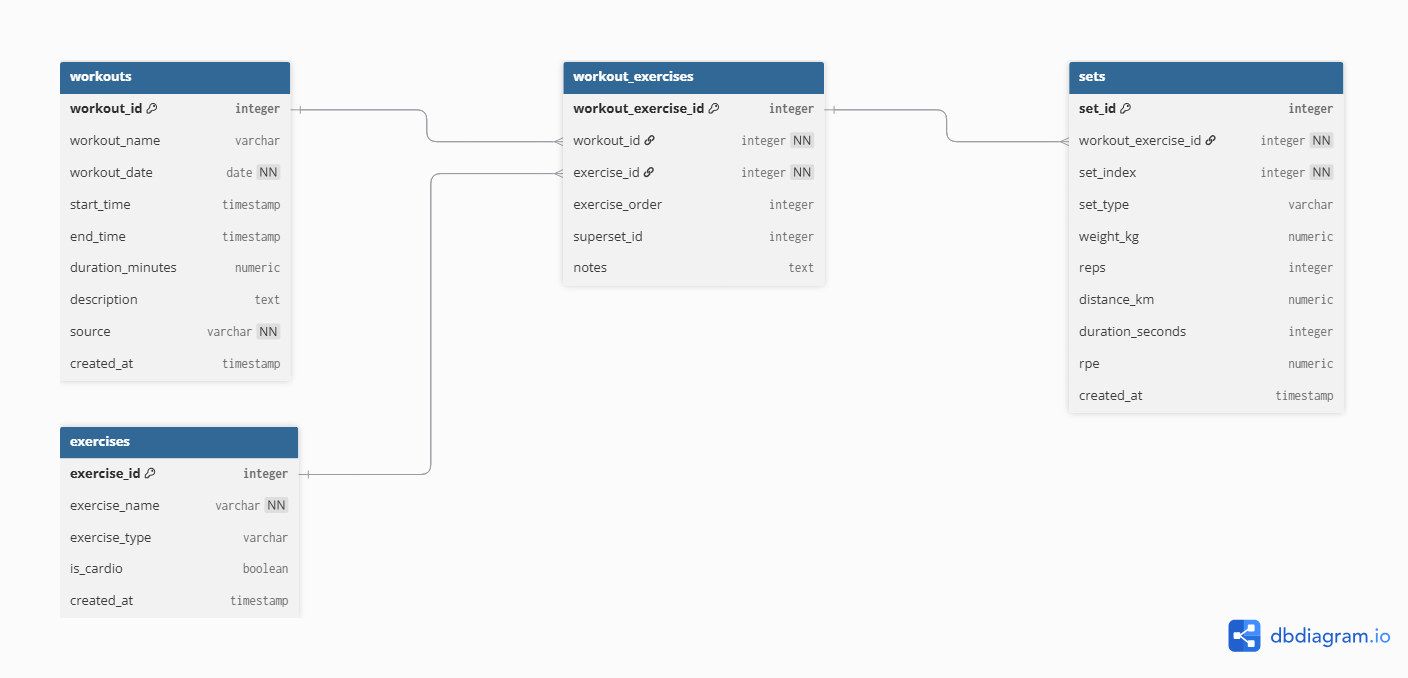
Schema Definition
The schema was explicitly defined to isolate all project objects.
Show SQL
CREATE SCHEMA IF NOT EXISTS fitness;
SET search_path TO fitness;
This ensures:
- Logical separation
- Namespace clarity
- Clean migration management
Core Tables
The modeling follows a normalized structure where:
1 workout → many exercises 1 exercise → many sets 1 day → 1 diet record
Foreign keys enforce consistency across all relationships.
Table: exercises
Show SQL
CREATE TABLE exercises (
    exercise_id SERIAL PRIMARY KEY,
    exercise_name TEXT NOT NULL UNIQUE,
    exercise_type TEXT,
    is_cardio BOOLEAN,
    created_at TIMESTAMP DEFAULT NOW()
);
Design Notes
exercise_nameis UNIQUE to prevent duplication during ETL.is_cardioallows future semantic filtering.exercise_typereserved for future classification (not hardcoded yet).- Timestamp ensures traceability.
This table acts as a dimension table for exercises.
Table: workouts
Show SQL
CREATE TABLE workouts (
    workout_id SERIAL PRIMARY KEY,
    workout_name TEXT,
    workout_date DATE NOT NULL,
    start_time TIMESTAMP,
    end_time TIMESTAMP,
    duration_minutes NUMERIC(5,2),
    description TEXT,
    source TEXT NOT NULL,
    created_at TIMESTAMP DEFAULT NOW()
);
Design Notes
workout_datestored separately for aggregation performance.duration_minutesprecomputed to avoid runtime calculation overhead.sourceexplicitly tracks ingestion origin (e.g., hevy_csv).- Not enforcing uniqueness constraint intentionally — allows ingestion flexibility if future multi-source system is introduced.
This table represents the training session grain.
Table: workout_exercises
Show SQL
CREATE TABLE workout_exercises (
    workout_exercise_id SERIAL PRIMARY KEY,
    workout_id INT NOT NULL REFERENCES workouts(workout_id) ON DELETE CASCADE,
    exercise_id INT NOT NULL REFERENCES exercises(exercise_id),
    exercise_order INT,
    superset_id INT,
    notes TEXT
);
Design Notes
This is a bridge table resolving:
- Many exercises per workout
- Exercise order inside workout
- Superset grouping
ON DELETE CASCADE ensures:
- Deleting a workout automatically deletes dependent records.
This avoids orphan data.
Table: sets
Show SQL
CREATE TABLE sets (
    set_id SERIAL PRIMARY KEY,
    workout_exercise_id INT NOT NULL REFERENCES workout_exercises(workout_exercise_id) ON DELETE CASCADE,
    set_index INT NOT NULL,
    set_type TEXT,
    weight_kg NUMERIC(6,2),
    reps INT,
    distance_km NUMERIC(6,3),
    duration_seconds INT,
    rpe NUMERIC(3,1),
    created_at TIMESTAMP DEFAULT NOW()
);
Design Notes
This is the most granular fact table.
Grain:
1 row = 1 set
Key decisions:
- Numeric precision defined explicitly
set_typenot constrained via ENUM to allow ingestion flexibility- No derived metrics stored (volume, 1RM etc.)
- RPE stored but not enforced
All analytical metrics will be calculated in Gold layer views.
Performance Indexes
Indexes were created to optimize common aggregation paths.
Show SQL
CREATE INDEX idx_workouts_date ON workouts(workout_date);
CREATE INDEX idx_exercises_name ON exercises(exercise_name);
CREATE INDEX idx_sets_type ON sets(set_type);
CREATE INDEX idx_sets_workout_exercise ON sets(workout_exercise_id);
Index Strategy
workout_date→ weekly aggregationsexercise_name→ lookup & joinsset_type→ filtering warmups/failure setsworkout_exercise_id→ join optimization
Indexes were added intentionally after understanding expected query patterns.
Nutrition Table
Show SQL
CREATE TABLE diet_daily (
    diet_date DATE PRIMARY KEY,
    carbs_g INT,
    protein_g INT,
    fat_g INT,
    calories_kcal INT,
    cardio_weekly_min INT,
    cycle_id INT
        REFERENCES cycles(cycle_id),
    bodyweight_kg NUMERIC(5,2),
    notes TEXT,
    created_at TIMESTAMP DEFAULT NOW()
);
Design Notes
Grain:
1 row = 1 day
Key decisions:
diet_dateis PRIMARY KEY → prevents duplicatescycle_idreferences a dimension table (cycles)- No macro-derived metrics stored
cardio_weekly_minkept at daily level for consistency with original structure
This table enables:
- Weekly averages
- Cycle segmentation
- Cross-analysis with training
Referential Integrity Strategy
Foreign keys were enforced in:
- workout_exercises → workouts
- workout_exercises → exercises
- sets → workout_exercises
- diet_daily → cycles
This guarantees:
- No orphan sets
- No unmapped exercises
- No diet record without valid cycle
The model prevents silent corruption.
Stage 4: ETL Pipeline (Amazon RDS)
After validating and cleaning the raw datasets, the next step was to load the data into a normalized relational schema deployed in Amazon RDS (PostgreSQL).
The ETL pipeline was executed against an Amazon RDS PostgreSQL instance under the fitness schema.
Environment Configuration
Database credentials were managed through environment variables to avoid hardcoding secrets.
Show Code
import os
from dotenv import load_dotenv

# Carrega o .env da raiz do projeto
load_dotenv()

DB_HOST = os.getenv("DB_HOST")
DB_PORT = os.getenv("DB_PORT", "5432")
DB_NAME = os.getenv("DB_NAME", "postgres")
DB_USER = os.getenv("DB_USER", "postgres")
DB_PASSWORD = os.getenv("DB_PASSWORD")
DB_SCHEMA = os.getenv("DB_SCHEMA", "fitness")

CSV_PATH = os.getenv("CSV_PATH")
This ensures:
- Secure configuration
- Easy migration between local and AWS environments
- No credentials stored in version control
Database Engine (Amazon RDS Connection)
Show Code
from sqlalchemy import create_engine
from etl.config.settings import (
    DB_HOST, DB_PORT, DB_NAME,
    DB_USER, DB_PASSWORD, DB_SCHEMA
)

def get_engine():
    if not DB_PASSWORD:
        raise RuntimeError("DB_PASSWORD não foi carregada do .env")

    url = (
        f"postgresql+psycopg2://{DB_USER}:{DB_PASSWORD}"
        f"@{DB_HOST}:{DB_PORT}/{DB_NAME}"
    )

    engine = create_engine(
        url,
        connect_args={"options": f"-csearch_path={DB_SCHEMA}"}
    )

    return engine
This engine connects directly to:
Amazon RDS → PostgreSQL → fitness schema
Load Order Strategy
Because of foreign key dependencies, the loading order must respect relational integrity:
- exercises
- workouts
- workout_exercises
- sets
This guarantees:
- No orphan records
- Valid foreign keys
- Controlled dependency resolution
Load — Exercises
Show Code
import pandas as pd
from sqlalchemy import text
from etl.utils.db import get_engine
from etl.config.settings import CSV_PATH


def load_exercises():
    engine = get_engine()

    # 1. Ler CSV (Bronze → memória)
    df = pd.read_csv(CSV_PATH)

    # 2. Extrair exercícios únicos
    exercises = (
        df["exercise_title"]
        .dropna()
        .drop_duplicates()
        .sort_values()
        .to_frame(name="exercise_name")
    )

    # 3. Inferir se é cardio
    cardio_mask = (
        df.groupby("exercise_title")[["distance_km", "duration_seconds"]]
        .apply(lambda x: x.notna().any().any())
    )

    exercises["is_cardio"] = (
        exercises["exercise_name"]
        .map(cardio_mask)
        .fillna(False)
    )

    # 4. Inserção idempotente
    insert_sql = text("""
        INSERT INTO exercises (exercise_name, is_cardio)
        VALUES (:exercise_name, :is_cardio)
        ON CONFLICT (exercise_name) DO NOTHING;
    """)

    with engine.begin() as conn:
        conn.execute(
            insert_sql,
            exercises.to_dict(orient="records")
        )

    print(f"[OK] {len(exercises)} exercises processed.")
Key logic:
- Extract unique exercises from CSV
- Infer
is_cardio - Insert using
ON CONFLICT DO NOTHING
Idempotent insert:
Show SQL
INSERT INTO exercises (exercise_name, is_cardio)
VALUES (:exercise_name, :is_cardio)
ON CONFLICT (exercise_name) DO NOTHING;
This ensures:
- Safe re-runs
- No duplication
- Deterministic state in RDS
Load — Workouts:
Show Code
import pandas as pd
from sqlalchemy import text
from etl.utils.db import get_engine
from etl.config.settings import CSV_PATH


def load_workouts():
    engine = get_engine()

    # 1. Ler CSV
    df = pd.read_csv(CSV_PATH)

    # 2. Parse datas
    df["start_time"] = pd.to_datetime(df["start_time"])
    df["end_time"] = pd.to_datetime(df["end_time"])

    # 3. Agrupar por sessão de treino
    workouts = (
        df.groupby(["title", "start_time", "end_time"], as_index=False)
        .agg(
            workout_name=("title", "first"),
            description=("description", "first")
        )
    )

    # 4. Campos derivados
    workouts["workout_date"] = workouts["start_time"].dt.date
    workouts["duration_minutes"] = (
        (workouts["end_time"] - workouts["start_time"])
        .dt.total_seconds() / 60
    )
    workouts["source"] = "hevy_csv"

    # 5. SQLs
    select_sql = text("""
        SELECT workout_id
        FROM workouts
        WHERE workout_name = :workout_name
          AND start_time = :start_time
          AND end_time = :end_time
    """)

    insert_sql = text("""
        INSERT INTO workouts (
            workout_name,
            workout_date,
            start_time,
            end_time,
            duration_minutes,
            description,
            source
        )
        VALUES (
            :workout_name,
            :workout_date,
            :start_time,
            :end_time,
            :duration_minutes,
            :description,
            :source
        )
    """)

    inserted = 0

    with engine.begin() as conn:
        for _, row in workouts.iterrows():
            exists = conn.execute(
                select_sql,
                {
                    "workout_name": row["workout_name"],
                    "start_time": row["start_time"],
                    "end_time": row["end_time"],
                }
            ).fetchone()

            if exists:
                continue

            conn.execute(insert_sql, row.to_dict())
            inserted += 1

    print(f"[OK] {inserted} workouts inserted.")
Steps:
Group by session (
title,start_time,end_time)Derive:
- workout_date
- duration_minutes
- source
Show SQL
SELECT workout_id
FROM workouts
WHERE workout_name = :workout_name
  AND start_time = :start_time
  AND end_time = :end_time
Only inserts if not found.
This prevents duplicate training sessions on re-execution.
Load — Workout Exercises:
Show Code
import pandas as pd
from sqlalchemy import text
from etl.utils.db import get_engine
from etl.config.settings import CSV_PATH


def load_workout_exercises():
    engine = get_engine()

    # 1. Ler CSV
    df = pd.read_csv(CSV_PATH)

    # Parse datas
    df["start_time"] = pd.to_datetime(df["start_time"])
    df["end_time"] = pd.to_datetime(df["end_time"])

    # 2. Buscar mapeamento de workouts
    with engine.begin() as conn:
        workouts_map = {
            (row.workout_name, row.start_time, row.end_time): row.workout_id
            for row in conn.execute(text("""
                SELECT workout_id, workout_name, start_time, end_time
                FROM workouts
            """))
        }

        exercises_map = {
            row.exercise_name: row.exercise_id
            for row in conn.execute(text("""
                SELECT exercise_id, exercise_name
                FROM exercises
            """))
        }

    # 3. Gerar estrutura workout_exercises
    records = []
    seen = set()

    for (
        workout_name,
        start_time,
        end_time
    ), group in df.groupby(["title", "start_time", "end_time"]):

        workout_id = workouts_map.get((workout_name, start_time, end_time))
        if not workout_id:
            continue

        exercise_sequence = (
            group["exercise_title"]
            .drop_duplicates()
            .tolist()
        )

        for order, exercise_name in enumerate(exercise_sequence):
            exercise_id = exercises_map.get(exercise_name)
            if not exercise_id:
                continue

            superset_id = (
                group[group["exercise_title"] == exercise_name]["superset_id"]
                .dropna()
                .unique()
            )
            superset_id = int(superset_id[0]) if len(superset_id) > 0 else None

            key = (workout_id, exercise_id, order)
            if key in seen:
                continue
            seen.add(key)

            records.append({
                "workout_id": workout_id,
                "exercise_id": exercise_id,
                "exercise_order": order,
                "superset_id": superset_id,
                "notes": None
            })

    # 4. Inserção idempotente
    insert_sql = text("""
        INSERT INTO workout_exercises (
            workout_id,
            exercise_id,
            exercise_order,
            superset_id,
            notes
        )
        VALUES (
            :workout_id,
            :exercise_id,
            :exercise_order,
            :superset_id,
            :notes
        )
        ON CONFLICT DO NOTHING;
    """)

    with engine.begin() as conn:
        conn.execute(insert_sql, records)

    print(f"[OK] {len(records)} workout_exercises processed.")
Responsibilities:
- Map workouts → exercises
- Preserve exercise order
- Preserve superset relationships
Show SQL
INSERT INTO workout_exercises (...)
VALUES (...)
ON CONFLICT DO NOTHING;
Ensures safe replay.
Load — Sets (Most Granular Layer):
Show Code
import pandas as pd
from sqlalchemy import text
from etl.utils.db import get_engine
from etl.config.settings import CSV_PATH


def clean_nan(value):
    """
    Converte NaN do pandas para None (NULL no PostgreSQL)
    """
    if pd.isna(value):
        return None
    return value


def load_sets():
    engine = get_engine()

    # 1. Ler CSV
    df = pd.read_csv(CSV_PATH)

    # Parse datas
    df["start_time"] = pd.to_datetime(df["start_time"])
    df["end_time"] = pd.to_datetime(df["end_time"])

    # 2. Mapas auxiliares
    with engine.begin() as conn:
        workouts_map = {
            (row.workout_name, row.start_time, row.end_time): row.workout_id
            for row in conn.execute(text("""
                SELECT workout_id, workout_name, start_time, end_time
                FROM workouts
            """))
        }

        exercises_map = {
            row.exercise_name: row.exercise_id
            for row in conn.execute(text("""
                SELECT exercise_id, exercise_name
                FROM exercises
            """))
        }

        workout_ex_map = {
            (row.workout_id, row.exercise_id, row.exercise_order): row.workout_exercise_id
            for row in conn.execute(text("""
                SELECT workout_exercise_id, workout_id, exercise_id, exercise_order
                FROM workout_exercises
            """))
        }

    inserted = 0

    insert_sql = text("""
        INSERT INTO sets (
            workout_exercise_id,
            set_index,
            set_type,
            weight_kg,
            reps,
            distance_km,
            duration_seconds,
            rpe
        )
        VALUES (
            :workout_exercise_id,
            :set_index,
            :set_type,
            :weight_kg,
            :reps,
            :distance_km,
            :duration_seconds,
            :rpe
        )
    """)

    exists_sql = text("""
        SELECT 1
        FROM sets
        WHERE workout_exercise_id = :workout_exercise_id
          AND set_index = :set_index
    """)

    with engine.begin() as conn:
        for (
            workout_name,
            start_time,
            end_time
        ), group in df.groupby(["title", "start_time", "end_time"]):

            workout_id = workouts_map.get((workout_name, start_time, end_time))
            if not workout_id:
                continue

            # Ordem dos exercícios dentro do treino
            exercise_sequence = (
                group["exercise_title"]
                .drop_duplicates()
                .tolist()
            )

            exercise_order_map = {
                name: idx for idx, name in enumerate(exercise_sequence)
            }

            for _, row in group.iterrows():
                exercise_id = exercises_map.get(row["exercise_title"])
                if not exercise_id:
                    continue

                exercise_order = exercise_order_map.get(row["exercise_title"])
                workout_exercise_id = workout_ex_map.get(
                    (workout_id, exercise_id, exercise_order)
                )

                if not workout_exercise_id:
                    continue

                exists = conn.execute(
                    exists_sql,
                    {
                        "workout_exercise_id": workout_exercise_id,
                        "set_index": int(row["set_index"]),
                    }
                ).fetchone()

                if exists:
                    continue

                conn.execute(
                    insert_sql,
                    {
                        "workout_exercise_id": workout_exercise_id,
                        "set_index": int(row["set_index"]),
                        "set_type": row["set_type"],
                        "weight_kg": clean_nan(row["weight_kg"]),
                        "reps": clean_nan(row["reps"]),
                        "distance_km": clean_nan(row["distance_km"]),
                        "duration_seconds": clean_nan(row["duration_seconds"]),
                        "rpe": clean_nan(row["rpe"]),
                    }
                )

                inserted += 1

    print(f"[OK] {inserted} sets inserted.")
This is the most sensitive layer:
- 1 row = 1 set
- Must match workout_exercise_id
- Must avoid duplication
Before insertion:
- Convert NaN → NULL (PostgreSQL compatible)
Show SQL
SELECT 1
FROM sets
WHERE workout_exercise_id = :workout_exercise_id
  AND set_index = :set_index
If exists → skip If not → insert
This makes the pipeline:
Fully idempotent at the lowest grain level
Pipeline Orchestration:
All steps were orchestrated through a single execution entrypoint:
Show Code
from etl.load.load_exercises import load_exercises
from etl.load.load_workouts import load_workouts
from etl.load.load_workout_exercises import load_workout_exercises
from etl.load.load_sets import load_sets


def run():
    print("=== ETL STARTED ===")

    load_exercises()
    load_workouts()
    load_workout_exercises()
    load_sets()

    print("=== ETL FINISHED ===")


if __name__ == "__main__":
    run()
This executed directly against:
Amazon RDS (PostgreSQL)
Idempotency Validation
The ETL pipeline was executed multiple times directly in Amazon RDS to validate replay safety and deterministic behavior. Across repeated executions, no duplicate exercises, workouts, or sets were created, and no referential integrity violations occurred. Row counts remained stable, confirming that the loading logic — including ON CONFLICT clauses and explicit existence checks — guarantees idempotent behavior and consistent state reconstruction.
This validates that the pipeline is replay-safe by design, meaning the same input dataset always produces the same relational state without unintended duplication or corruption.
Production Characteristics
The ETL architecture was intentionally designed with production principles in mind. The modular structure, explicit foreign key mapping, deterministic execution order, and SQLAlchemy-based connectivity ensure that the pipeline can be easily extended into scheduled batch jobs, containerized workflows, or orchestrated environments such as Lambda or Airflow.
At this stage, validated CSV datasets were transformed into a fully normalized relational schema in Amazon RDS using PostgreSQL, idempotent SQL patterns, and controlled schema management. The system is now structurally stable, cloud-portable, and prepared for analytical aggregation in the Gold layer and subsequent LLM contract generation.
Stage 5: Gold Layer
After loading the normalized relational model into Amazon RDS (PostgreSQL), the next step was to build the Gold Layer.
This layer was designed specifically for:
- Weekly deterministic aggregation
- Safe week-over-week comparison
- Explicit metric semantics
- No hidden calculations
- LLM-ready consumption
All views were created directly inside the Amazon RDS instance under the fitness schema.
Weekly Training Summary
This view aggregates training metrics at the weekly level.
Show SQL
CREATE OR REPLACE VIEW gold_weekly_fitness_summary AS
WITH training_summary AS (
    SELECT
        DATE_TRUNC('week', w.workout_date)::date AS week_start,
        COUNT(DISTINCT w.workout_id)             AS training_sessions,
        COUNT(s.set_id)                          AS total_sets,
        COUNT(*) FILTER (WHERE s.set_type = 'failure') AS failure_sets,
        ROUND(AVG(s.reps), 2)                    AS avg_reps_per_set
    FROM workouts w
    JOIN workout_exercises we
        ON w.workout_id = we.workout_id
    JOIN sets s
        ON we.workout_exercise_id = s.workout_exercise_id
    WHERE s.set_type <> 'warmup'
    GROUP BY week_start
)
SELECT
    d.week_start,

    -- Diet
    d.avg_calories_kcal,
    d.avg_carbs_g,
    d.avg_protein_g,
    d.avg_fat_g,
    d.avg_bodyweight_kg,
    d.cardio_weekly_min,
    d.logged_days,

    -- Training
    t.training_sessions,
    t.total_sets,
    t.failure_sets,
    t.avg_reps_per_set,

    -- Cycle
    c.cycle_name,
    c.cycle_type
FROM gold_weekly_diet_summary d
LEFT JOIN training_summary t
    ON d.week_start = t.week_start
LEFT JOIN cycles c
    ON d.cycle_id = c.cycle_id;
Purpose
This creates a stable weekly anchor containing:
- Diet averages
- Training volume
- Failure intensity
- Active cycle
This becomes the high-level weekly context layer.
Weekly Training Detail (Per Exercise)
Show SQL
CREATE OR REPLACE VIEW gold_weekly_training_detail AS
SELECT
    DATE_TRUNC('week', w.workout_date)::date AS week_start,

    e.exercise_name,
    mg.muscle_group_name,

    COUNT(s.set_id)                          AS total_sets,
    ROUND(AVG(s.weight_kg), 2)               AS avg_weight_kg,
    ROUND(AVG(s.reps), 2)                    AS avg_reps,
    MAX(s.weight_kg)                         AS max_weight_kg,

    COUNT(*) FILTER (WHERE s.set_type = 'failure') AS failure_sets
FROM workouts w
JOIN workout_exercises we
    ON w.workout_id = we.workout_id
JOIN exercises e
    ON we.exercise_id = e.exercise_id
JOIN exercise_muscle_map emm
    ON e.exercise_id = emm.exercise_id
JOIN muscle_groups mg
    ON emm.muscle_group_id = mg.muscle_group_id
JOIN sets s
    ON we.workout_exercise_id = s.workout_exercise_id
WHERE s.set_type <> 'warmup'
GROUP BY
    week_start,
    e.exercise_name,
    mg.muscle_group_name;
Purpose
This view exposes:
- Volume by exercise
- Muscle group mapping
- Average and maximum loads
- Failure density
This enables:
- Muscle-specific analysis
- Volume allocation insights
- Performance segmentation
Weekly Exercise Performance (Structured Metrics)
Show SQL
CREATE OR REPLACE VIEW gold_weekly_exercise_performance AS
SELECT
    DATE_TRUNC('week', w.workout_date)::date AS week_start,

    e.exercise_id,
    e.exercise_name,
    mg.muscle_group_name,

    COUNT(s.set_id) AS total_sets,

    COUNT(*) FILTER (
        WHERE s.set_type = 'failure'
    ) AS failure_sets,

    ROUND(AVG(s.reps), 2) AS avg_reps,

    ROUND(AVG(s.weight_kg), 2) AS avg_weight_kg,
    MAX(s.weight_kg)           AS max_weight_kg,

    SUM(s.reps) AS total_reps,

    COUNT(DISTINCT w.workout_id) AS sessions_count

FROM workouts w
JOIN workout_exercises we
    ON w.workout_id = we.workout_id
JOIN sets s
    ON we.workout_exercise_id = s.workout_exercise_id
JOIN exercises e
    ON we.exercise_id = e.exercise_id
JOIN exercise_muscle_map emm
    ON e.exercise_id = emm.exercise_id
JOIN muscle_groups mg
    ON emm.muscle_group_id = mg.muscle_group_id

WHERE s.set_type <> 'warmup'

GROUP BY
    week_start,
    e.exercise_id,
    e.exercise_name,
    mg.muscle_group_name;
Purpose
This is the LLM-facing metric layer.
It produces:
- Explicit totals
- Explicit averages
- Explicit max loads
- Explicit session count
No inferred metrics. No derived semantics. Only controlled aggregations.
Week-over-Week Progression
This view introduces temporal comparison using window functions.
Show SQL
CREATE OR REPLACE VIEW gold_weekly_exercise_progression AS
SELECT
    week_start,
    exercise_id,
    exercise_name,
    muscle_group_name,

    -- Current week metrics
    total_sets,
    total_reps,
    avg_reps,
    avg_weight_kg,
    max_weight_kg,
    failure_sets,
    sessions_count,

    -- Previous week metrics
    LAG(total_sets)      OVER w AS prev_total_sets,
    LAG(total_reps)      OVER w AS prev_total_reps,
    LAG(avg_reps)        OVER w AS prev_avg_reps,
    LAG(avg_weight_kg)   OVER w AS prev_avg_weight_kg,
    LAG(max_weight_kg)   OVER w AS prev_max_weight_kg,
    LAG(failure_sets)    OVER w AS prev_failure_sets,

    -- Deltas
    total_sets    - LAG(total_sets)    OVER w AS delta_total_sets,
    total_reps    - LAG(total_reps)    OVER w AS delta_total_reps,
    avg_reps      - LAG(avg_reps)      OVER w AS delta_avg_reps,
    avg_weight_kg - LAG(avg_weight_kg) OVER w AS delta_avg_weight_kg,
    max_weight_kg - LAG(max_weight_kg) OVER w AS delta_max_weight_kg,
    failure_sets  - LAG(failure_sets)  OVER w AS delta_failure_sets

FROM gold_weekly_exercise_performance
WINDOW w AS (
    PARTITION BY exercise_id
    ORDER BY week_start
);
Purpose
This enables:
- Deterministic progression tracking
- Explicit deltas
- Safe LLM comparison
Instead of asking the LLM to compute differences, the database computes them deterministically.
Final LLM Context View
This is the final structured analytical contract inside RDS.
Show SQL
CREATE OR REPLACE VIEW gold_llm_weekly_exercise_context AS
SELECT
    p.week_start,

    -- Exercise identity
    p.exercise_id,
    p.exercise_name,
    p.muscle_group_name,

    -- Training (current week)
    p.total_sets,
    p.total_reps,
    p.avg_reps,
    p.avg_weight_kg,
    p.max_weight_kg,
    p.failure_sets,
    p.sessions_count,

    -- Training deltas (vs previous week)
    p.delta_total_sets,
    p.delta_total_reps,
    p.delta_avg_reps,
    p.delta_avg_weight_kg,
    p.delta_max_weight_kg,
    p.delta_failure_sets,

    -- Diet context (weekly)
    d.avg_calories_kcal,
    d.avg_carbs_g,
    d.avg_protein_g,
    d.avg_fat_g,
    d.cardio_weekly_min,
    d.avg_bodyweight_kg,
    d.logged_days,

    -- Cycle context
    c.cycle_id,
    c.cycle_name,
    c.cycle_type

FROM gold_weekly_exercise_progression p
LEFT JOIN gold_weekly_diet_summary d
    ON p.week_start = d.week_start
LEFT JOIN cycles c
    ON d.cycle_id = c.cycle_id;
Purpose
This is the final structured semantic layer consumed by the JSON extractor.
It merges:
- Exercise performance
- Progression metrics
- Diet context
- Cycle context
Into a single analytical surface.
Gold Layer Summary
The Gold Layer was fully implemented inside Amazon RDS using SQL views.
Stage 6: Canonical JSON (LLM)
After building the normalized relational model and the Gold analytical layer, the final step was to generate a canonical, deterministic JSON contract designed specifically for language model consumption.
The goal was not to simply serialize database rows, but to:
- Eliminate relational complexity
- Remove ambiguity
- Provide explicit deltas (no inference required)
- Deliver a schema-stable, versioned payload
This JSON acts as the single source of truth for LLM analysis.
Design Principles
The canonical contract was designed under the following constraints:
- One file per week
- Fully deterministic structure
- Explicit weekly progression deltas
- No derived metrics inside the LLM
- No missing semantic context
- Schema versioning support
Schema Definition (Versioned Contract)
The schema is explicitly defined and version-controlled:
Show Code
{
  "week_start": "YYYY-MM-DD",
  "cycle": {
    "cycle_id": "int",
    "cycle_name": "string",
    "cycle_type": "cutting | bulking | maintenance | reverse"
  },
  "diet": {
    "avg_calories_kcal": "number",
    "avg_carbs_g": "number",
    "avg_protein_g": "number",
    "avg_fat_g": "number",
    "cardio_weekly_min": "number",
    "avg_bodyweight_kg": "number",
    "logged_days": "int"
  },
  "training_overview": {
    "training_sessions": "int",
    "total_sets": "int",
    "failure_sets": "int",
    "avg_reps_per_set": "number"
  },
  "exercises": [
    {
      "exercise_id": "int",
      "exercise_name": "string",
      "muscle_group": "string",
      "current_week": { ... },
      "delta_vs_last_week": { ... }
    }
  ]
}
Payload Builder Implementation
The JSON is generated from Gold views using a dedicated extraction script.
Show Code
import json
import os
from datetime import date
from decimal import Decimal

from sqlalchemy import text
from etl.utils.db import get_engine

# ===============================
# CONFIG
# ===============================

OUTPUT_DIR = "llm/payloads"
SCHEMA_VERSION = "v1"


# ===============================
# UTILS
# ===============================

def json_safe(value):
    """
    Converte tipos não serializáveis (Decimal, date, datetime)
    para formatos compatíveis com JSON.
    """
    if isinstance(value, Decimal):
        return float(value)
    if hasattr(value, "isoformat"):
        return value.isoformat()
    return value


# ===============================
# FETCH FUNCTIONS
# ===============================

def fetch_weekly_summary(conn, week_start):
    sql = text("""
        SELECT *
        FROM gold_weekly_fitness_summary
        WHERE week_start = :week_start
    """)
    row = conn.execute(
        sql,
        {"week_start": week_start}
    ).mappings().fetchone()

    return dict(row) if row else None


def fetch_exercise_context(conn, week_start):
    sql = text("""
        SELECT *
        FROM gold_llm_weekly_exercise_context_v1
        WHERE week_start = :week_start
        ORDER BY exercise_name
    """)

    rows = conn.execute(
        sql,
        {"week_start": week_start}
    ).mappings().fetchall()

    return [dict(r) for r in rows]


# ===============================
# PAYLOAD BUILDER
# ===============================

def build_payload(week_start: str):
    engine = get_engine()

    with engine.begin() as conn:
        weekly = fetch_weekly_summary(conn, week_start)
        if not weekly:
            raise RuntimeError(
                f"No weekly summary found for week_start={week_start}"
            )

        exercises_raw = fetch_exercise_context(conn, week_start)
        if not exercises_raw:
            raise RuntimeError(
                f"No exercise context found for week_start={week_start}"
            )

    # -------------------------------
    # Exercises
    # -------------------------------
    exercises = []

    for r in exercises_raw:
        exercises.append({
            "exercise_id": r["exercise_id"],
            "exercise_name": r["exercise_name"],
            "muscle_group": r["muscle_group_name"],

            "current_week": {
                "total_sets": r["current_total_sets"],
                "total_reps": r["current_total_reps"],
                "avg_reps": json_safe(r["current_avg_reps"]),
                "avg_weight_kg": json_safe(r["current_avg_weight_kg"]),
                "max_weight_kg": json_safe(r["current_max_weight_kg"]),
                "failure_sets": r["current_failure_sets"],
                "sessions_count": r["current_sessions"]
            },

            "delta_vs_last_week": {
                "total_sets": r["delta_sets"],
                "total_reps": r["delta_reps"],
                "avg_reps": json_safe(r["delta_avg_reps"]),
                "avg_weight_kg": json_safe(r["delta_avg_weight_kg"]),
                "max_weight_kg": json_safe(r["delta_max_weight_kg"]),
                "failure_sets": r["delta_failure_sets"]
            }
        })

    # -------------------------------
    # Final payload
    # -------------------------------
    payload = {
        "schema_version": SCHEMA_VERSION,
        "generated_at": date.today().isoformat(),
        "week_start": weekly["week_start"].isoformat(),

        "cycle": {
            "cycle_name": weekly["cycle_name"],
            "cycle_type": weekly["cycle_type"]
        },

        "diet": {
            "avg_calories_kcal": json_safe(weekly["avg_calories_kcal"]),
            "avg_carbs_g": json_safe(weekly["avg_carbs_g"]),
            "avg_protein_g": json_safe(weekly["avg_protein_g"]),
            "avg_fat_g": json_safe(weekly["avg_fat_g"]),
            "cardio_weekly_min": weekly["cardio_weekly_min"],
            "avg_bodyweight_kg": json_safe(weekly["avg_bodyweight_kg"]),
            "logged_days": weekly["logged_days"]
        },

        "training_overview": {
            "training_sessions": weekly["training_sessions"],
            "total_sets": weekly["total_sets"],
            "failure_sets": weekly["failure_sets"],
            "avg_reps_per_set": json_safe(weekly["avg_reps_per_set"])
        },

        "exercises": exercises
    }

    return payload


# ===============================
# SAVE
# ===============================

def save_payload(payload):
    os.makedirs(OUTPUT_DIR, exist_ok=True)

    fname = f"weekly_fitness_context_{payload['week_start']}.json"
    path = os.path.join(OUTPUT_DIR, fname)

    with open(path, "w", encoding="utf-8") as f:
        json.dump(payload, f, ensure_ascii=False, indent=2)

    return path


# ===============================
# MAIN
# ===============================

if __name__ == "__main__":
    # Use uma semana que você sabe que existe no banco
    WEEK_START = "2026-01-05"

    payload = build_payload(WEEK_START)
    path = save_payload(payload)

    print(f"[OK] Weekly context generated: {path}")
Why This Structure Is LLM-Optimal
The JSON contract was intentionally designed to eliminate the most common failure modes observed when large language models consume structured data. Instead of requiring the model to infer joins, compute temporal comparisons, or aggregate metrics on the fly, all calculations are performed upstream in the Gold layer. The LLM receives a fully contextualized, semantically complete representation of the week.
There are no implicit relationships left to interpret, no derived metrics to calculate, and no schema ambiguity. Weekly deltas are explicitly provided, progression is already computed, and all nutritional and training context is embedded within the same document. As a result, the model operates purely as an analytical reasoning layer rather than a data transformation engine. This dramatically increases reliability, interpretability, and consistency of responses.
Deterministic Properties
For any given week_start, the system always produces the exact same output. The canonical JSON is generated from stable Gold views, using a fixed schema definition, explicit ordering rules, and deterministic delta calculations based on window functions. There is no stochastic logic in the data layer, no dynamic field generation, and no schema mutation.
Because the transformation pipeline is idempotent and the Gold layer is reproducible, the JSON payload becomes a replay-safe artifact. Running the extraction process multiple times for the same week will always result in an identical file. This deterministic behavior is critical for safe LLM interaction, auditing, version control, and long-term system stability.
Architectural Role
The JSON contract represents the formal boundary between structured analytical data and generative AI systems. Upstream of this boundary, the system is strictly relational, normalized, and governed by SQL logic inside Amazon RDS. Downstream of this boundary, the system becomes model-agnostic and cloud-portable.
Because the contract is independent of any specific model provider, it can be stored in S3, consumed by Amazon Bedrock, OpenAI models, or any future inference endpoint without requiring changes to the data layer. This separation of concerns ensures that the analytical infrastructure remains stable even as the AI layer evolves.
Stage 7: AWS Execution
After the relational modeling, Gold-layer aggregation, and canonical JSON generation were completed, the final stage of the project was executed entirely within the AWS ecosystem.
The weekly payload generated from Amazon RDS was uploaded to Amazon S3 and consumed directly through Amazon Bedrock. The LLM interaction occurred inside the AWS environment, ensuring that the structured data layer, storage layer, and inference layer remained cloud-native and internally integrated.
The inference process followed this flow:
Amazon RDS (Gold Views) → Canonical JSON Extraction → S3 Upload → Amazon Bedrock (LLM Inference) → Generated Weekly Performance Report
The prompt was manually defined inside the Bedrock playground, and the JSON payload was provided as structured context. The model was instructed to generate a deterministic weekly analytical report, focusing on progression, regression, diet alignment, fatigue signals, and performance insights — without inventing metrics or extrapolating beyond the provided contract.
The entire execution was recorded to demonstrate real AWS operation, including payload submission and model response generation.
AWS Run-Once Execution (Bedrock Inference)
To demonstrate full cloud integration, the final analytical stage of the project was executed entirely inside Amazon Web Services.
This execution followed a run-once model, intentionally designed to validate the architecture while maintaining strict cost control. The objective was not continuous deployment, but architectural proof of integration between:
- Structured relational data (Amazon RDS)
- Canonical analytical artifact (JSON)
- Generative AI inference (Amazon Bedrock)
S3 Bucket Creation and Canonical Payload Upload
The first step of the cloud execution layer was the creation of an Amazon S3 bucket to store the canonical JSON contract generated from the Gold layer.
The recorded demonstration includes:
- Creation of a dedicated S3 bucket
- Proper configuration and region selection
- Upload of the generated weekly JSON payload
- Verification of the object structure inside AWS
This step establishes S3 as the formal storage boundary between deterministic data engineering outputs and AI consumption layers.
By uploading the JSON to S3, the architecture aligns with production-grade patterns where:
- Analytical artifacts are versioned
- Outputs are cloud-stored
- Downstream services can consume structured data
- The data platform remains decoupled from inference engines
The S3 object represents the finalized analytical state of a given week_start.
Amazon Bedrock Prompt Execution and LLM Report Generation
After the canonical JSON was available in AWS, the next step was inference execution inside Amazon Bedrock.
In the recorded demonstration:
- The Amazon Bedrock Playground was opened
- A Claude model was selected
- The canonical JSON payload was inserted as structured context
- A engineered analytical prompt was defined
- The model generated a weekly performance report
- The result was reviewed and validated against the structured input
The prompt was designed to:
- Constrain reasoning strictly to provided data
- Avoid external assumptions
- Focus on progression and regression signals
- Correlate diet and training metrics
- Produce structured analytical insights rather than narrative speculation
The model operates purely as an analytical reasoning layer, not as a data transformation layer.
This confirms that the system successfully transitions from:
Relational Modeling (RDS) → Analytical Aggregation (Gold Layer) → Deterministic JSON Contract → Cloud Storage (S3) → Generative Analysis (Bedrock)
The execution was run-once to minimize cloud costs, but the architecture fully supports future automation through event-driven or scheduled orchestration.
Project Conclusion
This project demonstrates the full construction of an end-to-end analytical data platform, starting from raw operational CSV exports and evolving into a cloud-executed, AI-ready reporting system. Every stage was deliberately engineered with production principles in mind: explicit data auditing before ingestion, normalized relational modeling in Amazon RDS, idempotent ETL design, deterministic Gold-layer aggregations, and a strictly defined canonical JSON contract. Rather than relying on the LLM to interpret raw or semi-structured data, the architecture ensures that all business logic, aggregation rules, and temporal comparisons are resolved upstream — preserving analytical correctness and reproducibility.
By executing the final stage inside AWS using Amazon S3 and Amazon Bedrock, the system transitions from a traditional data platform into a structured generative analytics engine. The run-once deployment validates real cloud integration while maintaining cost efficiency, proving that the architecture is portable, reproducible, and ready for automation. What began as personal training and nutrition logs was transformed into a deterministic, model-consistent, and LLM-optimized analytical system.
GitHub Repository
Access all code, datasets, notebooks, and files for this project: